The DGX Spark shutdown owners keep hitting is CPU-side, not GPU-side — here's what a 23.9-hour soak on my unit showed
If you've read DGX Spark reviews, you've read "no throttle." I believe them. They're still going to get someone's overnight training run killed, because they're measuring the wrong thing with the wrong workload.
Here's the gap. Almost every "no throttle" verdict comes from a short inference benchmark that watches the GPU temperature. The GPU holds somewhere around 82 °C in the reported cases, the tokens keep flowing, verdict rendered. But run a sustained training job and the box can hard-shut-down. And when it does, the GPU sensor is not where the heat is.
Owners found this before the reviewers did
I want to credit this correctly, because the honest version is stronger than "I discovered a thing." The CPU-side shutdown is already documented on NVIDIA's own developer forum. One owner (cshangyt) reported the CPU peaking around ~95 °C right before the crash. Another (kralvis, same thread) posted a live dgxtop snapshot from the moment of shutdown: CPU 91 °C while the GPU sat at 82 °C. That's the whole story in one screenshot. The GPU looks fine, the CPU is cooking, and a review that watches only the GPU sensor misses the whole event. The same thread even shows the workload-dependence: shallow training configs complete fine, deeper ones shut the box down.
So the contribution here isn't the discovery, and it isn't the fix — owners get credit for both. It's the measurement: a full multi-hour curve of the failure mechanism developing on a unit that stayed under the line, and the operational hardening that follows from it.
What my unit actually did during a sustained run
I ran a sustained LoRA fine-tune (an 8B model) with a read-only logger sampling every 30 seconds: all the ACPI thermal zones, GPU temperature, GPU power and clocks, host memory, and the training step. The logged span is 23.9 hours end to end — two back-to-back training phases with an ~82-minute idle gap around hour five and a half (that's the dip you'll see in the curve), so call it ~22.4 hours under load. Here's what my box did:
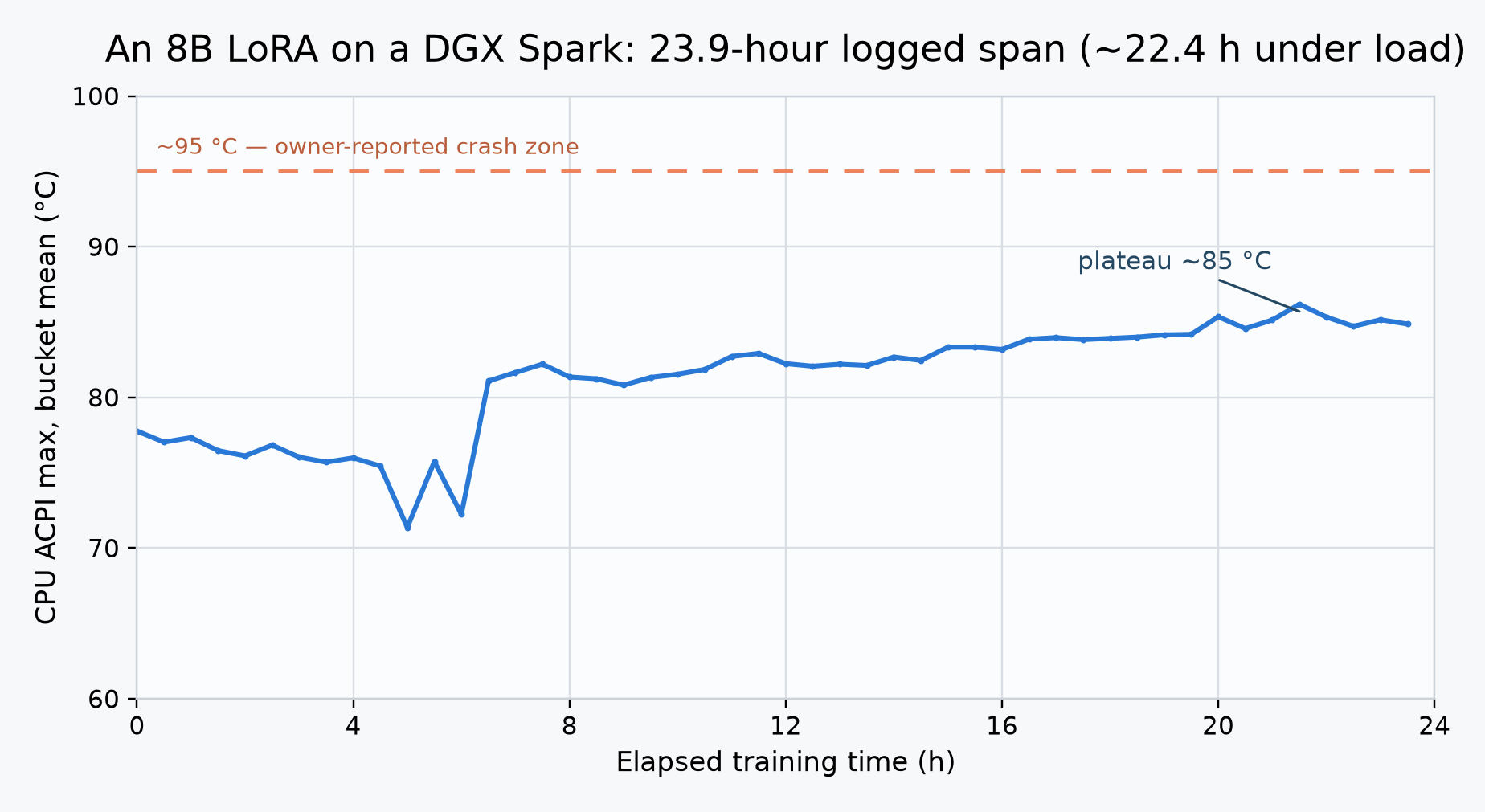
- CPU/ACPI zones: a slow ~20-hour climb, then a plateau. About 77 °C average in hour one, ~85 °C average by hour 20, then flat at 85 ±1 °C for the final four hours. Peak: 88 °C — brief spikes; the sustained level was ~85 °C.
- GPU: 66–84 °C under load (it drops to the 40s during the idle gap). Crept up alongside the CPU, peaked late in the run.
- Power: up to ~72 W.
- GPU clocks: never below 2411 MHz under load. Zero throttle, zero shutdown, the entire span.
So the plateau-vs-climb question has an answer: it plateaus — but higher and much later than a short benchmark would ever show you. The box spent twenty hours creeping from 77 to 85 °C before it settled (not perfectly smoothly — the dip around hour five and a half is the idle gap between the two phases; the raw CSV is in the repo), and the peak of 88 °C sits about 7 °C below the ~95 °C crash reports, and only about 3 °C below the coolest reported crash, that 91 °C dgxtop snapshot. That's a real margin. It is not a comfortable one. My run was one 8B LoRA in a temperate room; a heavier training job, a hotter room, or a dustier intake could plausibly close that gap, which is exactly why the owners who crashed, crashed. What held throughout: no throttle, no shutdown, the signal is CPU-side (my GPU looked fine the whole time; a GPU-only sensor tells you nothing), and the climb is slow enough that you can see it coming if you watch the right sensor. The takeaway isn't "LoRA is safe." It's: the danger is real, it's on the CPU, it takes hours to develop, and it's visible the whole way.
One honest complication: at least one owner argues the crashes aren't thermal at all: power-delivery transients, on the evidence that a unit that crashed was running a couple degrees cooler than one that didn't. I can't rule that out. What I can say is that the CPU-temperature correlation is real in the reports I can read, and the mitigation below works regardless of which mechanism is dominant. (The counter-hypothesis is written up in the repo's objections file, with the rest of the arguments against my own conclusions.)
The fix is cheap
The mitigation owners converged on, and the one I'd run on any always-on unit, is capping the GPU clock:
# -lgc takes <minMHz,maxMHz> as an integer pair; this caps the MAX clock at 2200 MHz.
sudo nvidia-smi -lgc 0,2200   # value is community-reported / tunable — verify on your unit
Reported cost: 0–2% throughput, in exchange for the shutdowns going away. For a box whose entire value proposition is running unattended overnight, that trade is not close.
The trap that's actually worse than heat
Here's the one that cost me the most sleep, and it isn't thermal at all: the unified-memory OOM hard-wedge.
The Spark's ~122 GiB of usable unified memory is shared between CPU and GPU. Push a model or a training job past what's free and the host doesn't OOM-kill a process gracefully — it freezes. SSH dies. You walk over and power-cycle it. And the part that surprised me most: running the workload in a container with a cgroup memory limit does not save you, because the wedge happens at the unified-memory layer below the container. The cgroup limit is real for the process. The host freeze is beneath it.
If you're going to leave this box doing unattended work — which is the entire point of the box — harden for this before you trust it:
- Run
earlyoomso something gets killed before the host wedges. - Keep a second SSH session open as a lifeline, or a backup login like Dropbear, so a wedge doesn't always mean a walk to the machine.
- Keep memory bounded, and keep
sudo sh -c 'sync; echo 3 > /proc/sys/vm/drop_caches'handy.
And while we're correcting the record: the power number
The famous 7–11 W idle figure is bare idle, nothing loaded. True, and genuinely impressive. But it's not the number you operate at. With a model resident, the GPU pins to a higher power state to hold the weights, and under real load you're in the tens of watts. Still extraordinary for what it does. Just don't quote 7 W for a box that's actually working.
The verdict for a 24/7 node
The Spark is a genuinely good always-on node, and nothing above changes that. But "always-on" is precisely the mode the short reviews don't test, so their clean bill of health answers a question you're not asking. Before you trust this box unattended: cap the clock, run earlyoom, keep a lifeline session, and watch the CPU temperature — not the GPU.
Thermal numbers logged on my own unit; forum reports linked and credited. The logger script, the raw 23.9-hour CSV, and the chart-regeneration code are in the repo.
Get new posts by email — first
The newsletter is in the works — join the waitlist and be first to know when it launches. Everything here stays free to read.
The Solo Stack is written by Matt — building products solo with AI, on his own infrastructure. If a claim isn’t backed by experience or a measurement, it doesn’t ship.
Not sending yet: joining stores your address on the waitlist. One confirmation email at launch — nothing sends unless you confirm.